Know every day how much you can still spend
Peppies is your household budget app for the Netherlands. Split your monthly money into pots, drop in your bank statement — no bank connection needed — and see at a glance whether you are on track. Whether you live alone, together or co-parent.
One app, your whole week
Watch how Peppies works — from what you can still spend today to the appointments and groceries of your week.
- 1
See what you can still spend
Add an expense and you instantly see what is left for today.
- 2
One calendar for everyone
Add an appointment — the whole household sees it right away.
- 3
Tick off groceries together
What one of you adds, the other ticks off in the shop.
To spend
Available today
€35
You are €35 ahead of plan
Recent expenses
Petrol station
€48
A grip on your money, with the rest of your household included
No more scattered apps, notes and calendars. Peppies brings it together — clear, friendly and adaptable to how you live.
Smart budget
Drop in your bank statement, it sorts itself, and you see per day what you can still spend. Fixed costs and subscriptions neatly separate.
Saving & pots
A daily pot per category that rolls over, savings goals with a target date and, at the end of the month, advice on what you can set aside.
Wealth & net worth
Your net worth at a glance: assets plus savings minus debts, with a trend line over time.
Solo mode
Living alone? Peppies hides the family features and adapts its wording. Everything just for you.
Pep, your smart helper
Ask what you can still spend this week or let Pep think along with your planning. Smart help that knows your week.
Calendar
All appointments in one place — filled automatically from your Google, Outlook or Parro calendar, with a reminder exactly when you need it.
Shopping list
What you add is right there when you are in the shop. Share the list with your housemates — never double or forgotten again.
Smart reminders
A heads-up six months before your passport, ID, car inspection (APK) or insurance expires — and in time for birthdays and holidays.
Documents & cards
Loyalty cards with barcode (library, savings and fuel cards) always at the checkout — plus warranties and documents in one place.
Co-parenting
For separated parents: an alternating week schedule and shared appointments between two households — without sharing each other's private data.
Family mail
Your own email address: mail your bank statement and it lands in your budget. Pep recognises invoices and warranties, you decide with one tap. (Premium)
Weather
The forecast for your location, linked to your plans — so you know whether that training session is going ahead.
Ready in three steps
No hassle with installing or setting up. Everything is ready within a minute.
Create an account
Done in half a minute — solo or as a household, no app store or download required. The first 3 days are free.
Connect your calendar & bank
Paste your calendar link and drop in your bank statement. Peppies fills everything in automatically.
Continue solo or together
Use Peppies for yourself or invite your housemates. Everyone gets their own login, everything is shared.
Connect any calendar — in one minute
Google Calendar, Apple Calendar, Outlook, Parro, Teamup — if it has an iCal link, it works in Peppies right away. No sync hassle, just paste and done.
Open your calendar app
Go to the settings of your Google Calendar, Outlook, Apple or Parro account.
Copy the iCal link
Look for "Secret address in iCal format" or "Calendar URL". Copy the link (it starts with webcal:// or https://).
Paste it into Peppies
Go to Settings → Integrations → Calendar and paste your link. All appointments appear right away.
A budget that thinks along with you
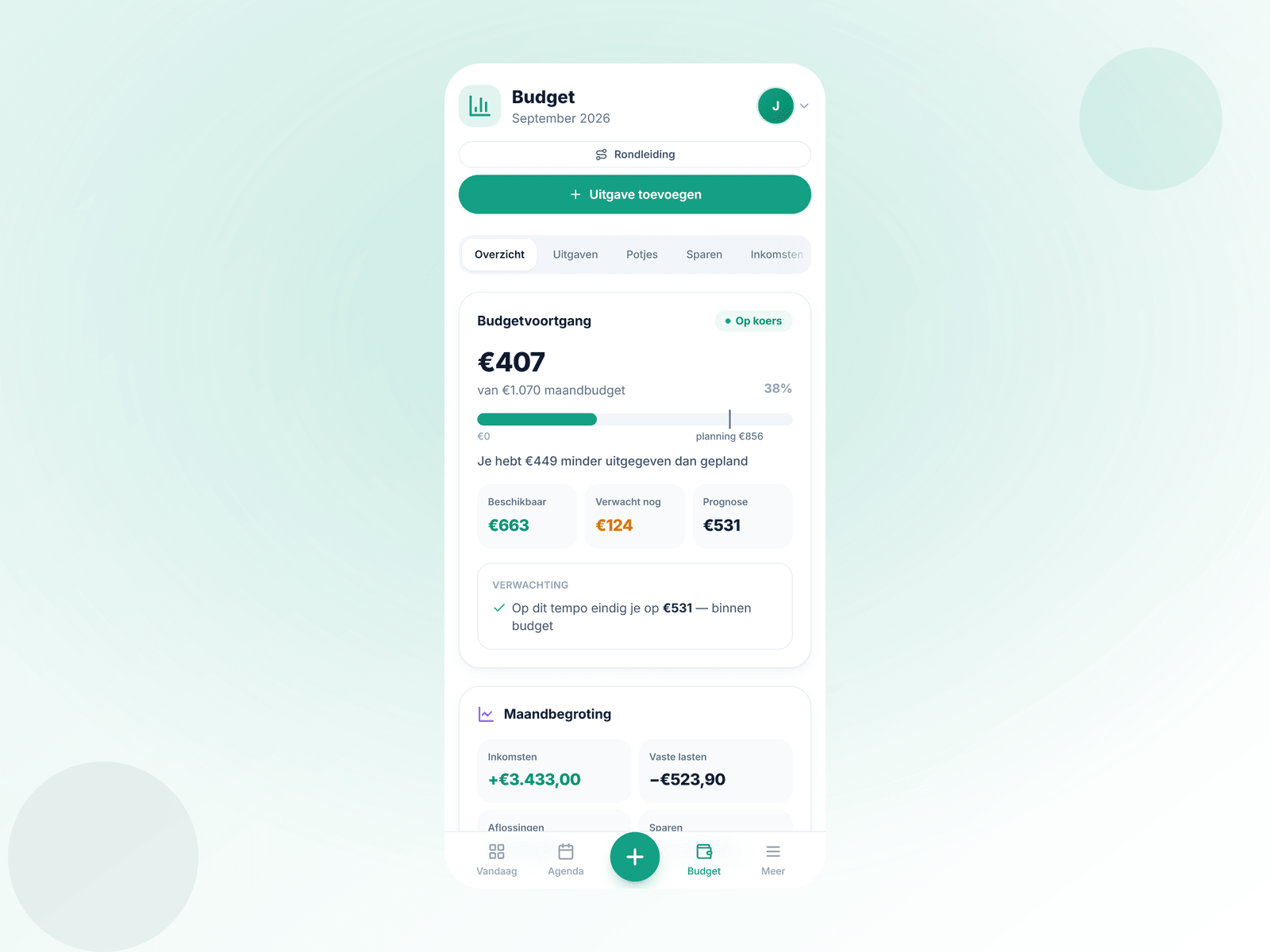
Split what you have left each month into pots — one per topic. On every bar you see not just what you have spent, but also where you should be according to plan — so you know without doing the maths whether you are doing well.
- 1
Spending versus plan
The marker on the bar shows where you should be according to plan — ahead or behind, you see it right away.
- 2
Pots per topic
Groceries, transport, or a personal pot per person — you decide how to split it.
- 3
Forecast per pot
Pep watches your pace and warns you when a pot is nearly empty — so you can top it up in time.
- 4
Saving comes off first
Savings goals are reserved first; the rest you spread over your pots.
Available today
€40
You are €40 ahead of plan
right on plan
above plan — top up €25?
Forecast: €180 left this month
a nice amount to move to your savings account
Never surprised by a date again
Peppies keeps an eye on the important dates for you and gives you a timely heads-up — on your phone, to the right person.
Passport & ID
A heads-up six months in advance — for the kids too.
Car inspection (APK) & insurance
Reminded well in advance, so you are never too late.
Birthdays & holidays
Father's Day, Mother's Day, Sinterklaas and every birthday, right on time.
Mail it, Peppies takes care of the rest
You get your own Peppies email address. Mail your bank statement to it (CSV, MT940 or CAMT.053) and it is filed into your budget straight away. Or forward your invoices, warranties and contracts: Pep recognises the company and the warranty or end date, and you decide with one tap.
Statements load themselves
Expenses categorised, fixed costs recognised and duplicate transactions skipped — no confirmation needed.
You decide, not the computer
For mail, you choose: book it as an expense, save it as an invoice/warranty, or add it to the calendar.
A heads-up in time
Is a warranty or contract about to expire? You hear about it well in advance.
Also for separated parents and blended families
Two homes, one overview for the kids. Set up the care schedule the way it works for you — week on, week off, weekends only or per day — and link your Peppies to the other parent's, so shared appointments appear in both calendars without sharing each other's private data.
- Flexible care schedule — alternating weeks, weekends only or per day
- Link two households: shared appointments in both calendars
- Only what you share is visible; the rest stays private
- Each household has its own secure space
Co-parenting
Linked with Dad
One card, the whole family benefits
Loyalty cards, savings cards and the library card — save them with a photo or barcode and share them with everyone at home. That way the whole family gets the discount and everyone always has their card with them.
All cards in one place
Loyalty cards, savings cards and the library card — save them as a photo or barcode.
Share with your family
Add it once and everyone at home has the card with them — the kids too.
Save together & get discounts
Everyone collects points and gets the discount. And from now on anyone can go to the library.
What is your net worth?
Calculate in seconds the difference between what you own and what you owe. Peppies tracks your wealth over time: savings, investments, your home and debts in one overview.
Why invest?
Money in a savings account loses purchasing power to inflation. Investing over a long period — often 10+ years — has historically returned an average of 5–8% per year on a broadly diversified index.
Diversification is key
Do not pick a single company or country, but spread broadly through a global index fund (such as an MSCI World ETF). That way you benefit from global economic growth without putting all your eggs in one basket.
Invest monthly
By investing a fixed amount every month — even when prices drop — you automatically buy more shares when they are cheap. This is called 'dollar-cost averaging' and works well for beginners and experienced investors alike.
This is general educational information, not personal investment advice. Investing involves risk — you can lose (part of) your investment. Consult a financial adviser for tailored advice.
Calculate your net worth
Assets
€0
Debts
€0
Your net worth
€0
Track your net worth over time, set savings goals and see how investing grows your wealth — in Peppies.
Track it in PeppiesPeppies on your phone, without an app store
Install Peppies straight from your browser on your phone or tablet, just like a regular app. Open it with one tap from your home screen — fast and familiar.
Frequently asked questions
What does Peppies cost?+
You try Peppies free for 3 days, with everything included and no payment details needed. After that you choose Complete for €1.99 per month — cancel monthly. You pay through Apple in the iPhone app, through Google Play in the Android app, and with iDEAL or card on the website.
Does Peppies work if I live alone?+
Absolutely. Turn on solo mode when creating your account. Family and kids features are hidden and the wording adapts ("my" instead of "our").
How does importing my bank statement work?+
You download the statement from your bank (CSV, MT940, CAMT or Excel) and drop it into Peppies. It is read on your own device and categorised automatically. You choose whether to import only expenses, only income or both. Works with every Dutch bank — ING, ABN AMRO, Rabobank, bunq and others.
Do I need to download anything from an app store?+
No. You install Peppies straight from your browser on your phone or tablet. One tap from your home screen and you are ready to go.
Can the whole household join?+
Of course. Invite your housemates by email; everyone gets their own secure login. Notifications can be directed per person.
Does Peppies work for co-parenting or a blended family?+
Yes. Set up the alternating week schedule and link your Peppies to the other parent's. You then see shared appointments in both calendars — the rest stays private per household.
What does Pep do with my data?+
You decide whether Pep is on and which data it may use. Everything can be set per category and switched off completely. You can export your data or delete your account with one click.
Is Peppies an expense tracker app?+
Yes, and more than that. You track your expenses, import your bank statement and see per day what you can still spend — with pots, savings goals and fixed costs neatly separate. On top of that, calendar and groceries are in the same app.
Does Peppies work on iPhone and Android?+
Yes. Peppies works in any browser and you install it with one tap on your home screen — on iPhone, iPad and Android. For iPhone and iPad there is also an app in the App Store.
Is Peppies available in English?+
Yes. The app is fully available in English and Dutch, so it works for expats and internationals in the Netherlands as well as Dutch households. You can switch language at any time in Settings.
Does Peppies also help with Dutch benefits (toeslagen) and taxes?+
Yes. The benefits check shows, based on your situation, whether you are likely entitled to Dutch government allowances (toeslagen) such as zorgtoeslag (healthcare benefit), huurtoeslag (housing benefit), kindgebonden budget (child budget) or kinderopvangtoeslag (childcare benefit) — many households leave hundreds of euros a year on the table. For the exact amount we refer you to the official calculator of the Belastingdienst (Dutch tax office), and you set reminders for the tax return deadline with one tap.
Ready for more peace of mind at home?
Try Peppies free for 3 days, starting today. Ready in a minute — solo, together or co-parenting, always in one place.
Try 3 days freeReach families at the right moment
Peppies is where families plan their week, do their groceries and manage their budget. Place a sponsored tip at exactly the moment it fits — next to the shopping list or the budget. Not a banner nobody sees, but a useful suggestion families actually benefit from.
Get in touchContextual placement
A sponsored tip, exactly where it is relevant.
Reach all of the Netherlands
Families, singles and co-parents — actively managing their household.
Relevant only
The user stays in control. Useful always beats pushy.